Plugins for WordPress can be very elaborate and require significant programming expertise to develop. But learning to develop a WordPress plugin doesn't have to be difficult; you can start small and grow your skills over time. Let's start with a very simple WordPress plugin that you might build for yourself or a client.
Name the Plugin File and Subdirectory
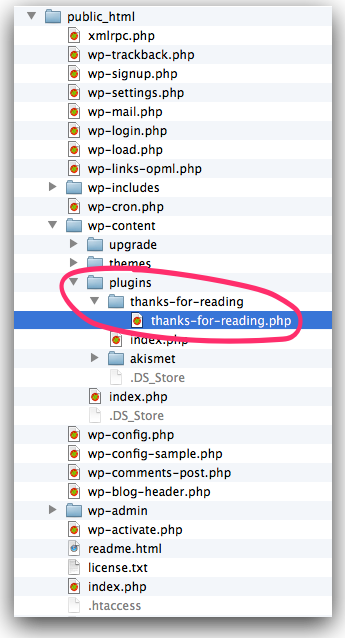
Start by naming your plugin. We'll call this one "Thanks for Reading." You'll name your PHP file thanks-for-reading.php and by convention put in a /thanks-for-reading/ subfolder of the WordPress /wp-content/plugins/ directory.
Name using Lowercase and Underscores
TIP: When you name your files and directories we recommend you always use lowercase and dashes, never proper case nor underscores. "When in Rome" as they say. So please don't name your plugin files ThanksForReading.php, or worse Thanks_for_Reading.php.
Check Name in the WordPress Plugin Repository
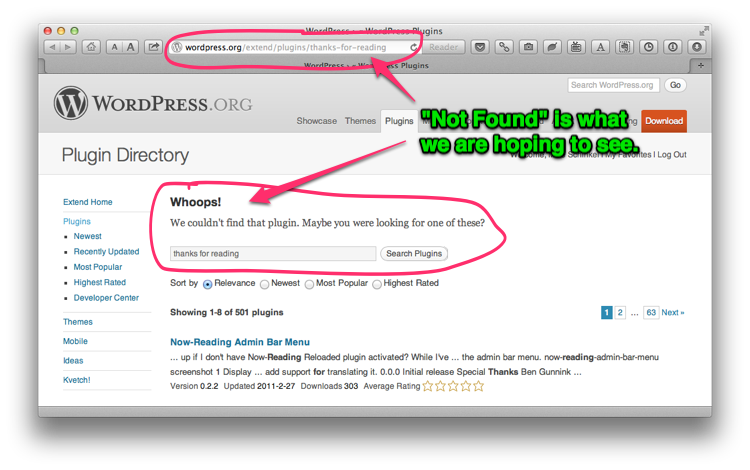
But make sure there isn't a same-named plugin in the WordPress plugin repository by testing your desired plugin directory name on the end of the URL for plugins at wordpress.org to minimize potential future conflict with an existing plugin or if you ever want to publish yours:
At the time of these writing there was no thanks-for-reading plugin in the WordPress plug repository. So far so good.
Add a Plugin Header
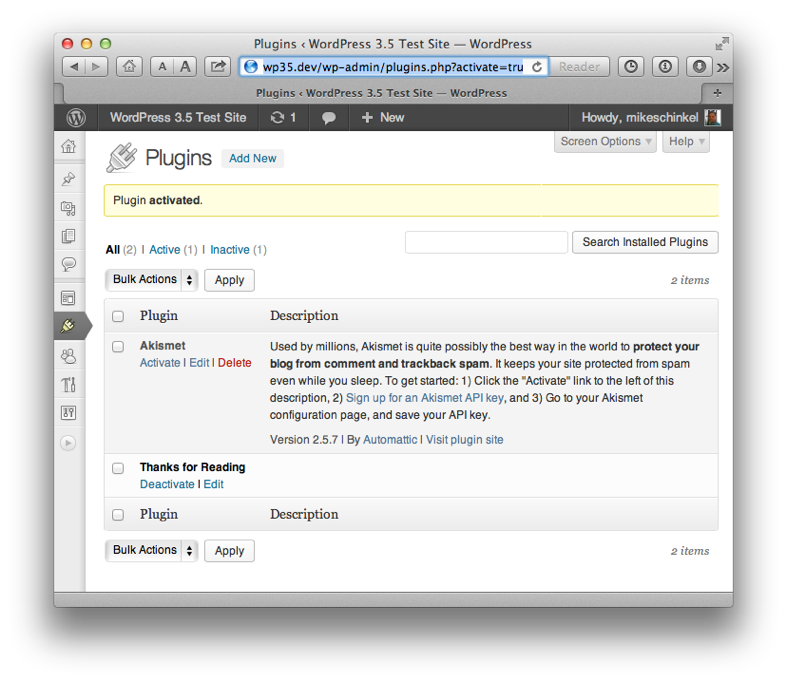
Next add a plugin header to thanks-for-reading.php so WordPress can recognize your plugin. A plugin header is a simple PHP comment at the top of the file that minimally only needs the text Plugin Name: followed by the name of your plugin that you want end users to see:
-
<?php
-
/*
-
* Plugin Name: Thanks for Reading
-
*/
<?php
/*
 * Plugin Name: Thanks for Reading
 */
Using "Hooks" to Modify a WordPress Site's Behavior
WordPress provides a system of "hooks" that allow plugins at selected points to generate output or modify variable state via "actions" and/or to modify data used by WordPress via "filters." Learning which hooks are available and how you use each one can take years but again you can learn plugin development in baby steps, one hook at a time.
Write your Filtering Function
The actual work of the plugin is contained in your function. Here's our proposed function:
-
function the_content( $content ) {
-
return $content . '<p>Thanks for Reading!</p>';
-
}
function the_content( $content ) {
  return $content . '<p>Thanks for Reading!</p>';
}
The function above receives the HTML for the post body in the parameter $content to which it add the HTML snippet '<p>Thanks for Reading!</p>' before returning the new value back to WordPress. And that's all the function needs to do. Except...
Add a Hopefully-Unique Prefix
Unfortunately the function name the_content() conflicts with an existing function in WordPress so the above doesn't work. To address these conflicts be sure to prefix your function names. You'll want something hopefully unique and not likely to conflict with function names other plugins or themes might use. We'll use tfr which is an initialism for "Thanks for Reading":
-
function tfr_the_content( $content ) {
-
return $content . '<p>Thanks for Reading!</p>';
-
}
function tfr_the_content( $content ) {
  return $content . '<p>Thanks for Reading!</p>';
}
Add the Filter Hook
Now that we have our function we can add a call to the WordPress add_filter() function where the first value passed is the hook name 'the_content' and the second value passed 'tfr_the_content' is the function name:
-
add_filter( 'the_content', 'tfr_the_content' );
-
-
function tfr_the_content( $content ) {
-
return $content . '<p>Thanks for Reading!</p>';
-
}
add_filter( 'the_content', 'tfr_the_content' );

function tfr_the_content( $content ) {
  return $content . '<p>Thanks for Reading!</p>';
}
And that's all there is to it.
The Complete Plugin
Here's the big picture, albeit admittedly quite small in this case:
-
<?php
-
/*
-
* Plugin Name: Thanks for Reading
-
*/
-
add_filter( 'the_content', 'tfr_the_content' );
-
-
function tfr_the_content( $content ) {
-
return $content . '<p>Thanks for Reading!</p>';
-
}
<?php
/*
 * Plugin Name: Thanks for Reading
 */
add_filter( 'the_content', 'tfr_the_content' );

function tfr_the_content( $content ) {
  return $content . '<p>Thanks for Reading!</p>';
}
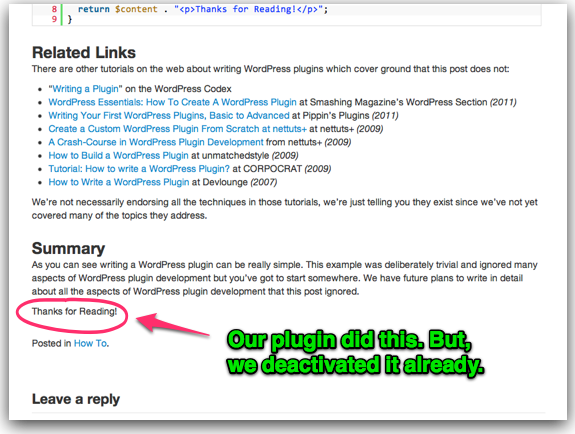
See what this post looks like with the Thanks for Reading plugin activated:
Related Links
There are other tutorials on the web about writing WordPress plugins which cover ground that this post does not:
- Writing a Plugin at the WordPress Codex
- WordPress Essentials: How To Create A WordPress Plugin at Smashing Magazine's WordPress Section (2011)
- Writing Your First WordPress Plugins, Basic to Advanced at Pippin's Plugins (2011)
- Create a Custom WordPress Plugin From Scratch at nettuts+ at nettuts+ (2009)
- A Crash-Course in WordPress Plugin Development from nettuts+ (2009)
- How to Build a WordPress Plugin at unmatchedstyle (2009)
- Tutorial: How to write a WordPress Plugin? at CORPOCRAT (2009)
- How to Write a WordPress Plugin at Devlounge (2007)
We're not necessarily endorsing all the techniques in those tutorials since we've not read each of them in-depth, we're just telling you they exist. Caveat emptor.
Summary
As you can see writing a WordPress plugin can be really simple. This example was deliberately trivial and ignored many aspects of WordPress plugin development but you've got to start somewhere. We have future plans to write in detail about all the aspects of WordPress plugin development that this post ignored
Follow up Posts
If you'd like to learn more about writing WordPress plugins you you might want to read this post too:
Thanks for the simple tutorial, I have been looking for a mailing list style plugin for a very long time, and this has enabled me to write my own 🙂
Thanks again
Matt
This is a great tutorial to show the beginnigns of WordPress plugin development, and a good intro to hooks and filters. Thanks, looking forward to more great tutorials like this one.
Hey Matt & Zachary,
Thanks for the positive comments. Glad I could help! Please do check out the other posts because this post was just the starting point for how to code a plugin. Plan to post a lot more all about plugin development over the coming year as well.
-Mike
Pingback: Plugin Development 101 - An Intro to Filters | Pippins Plugins
Quick question – looking at the code for The Complete Plugin, do you need to have a closing
?>for the opening<?php? Or is it okay to just end with a}?Thanks for the tutorial! Plugin development is something I've been trying to learn, but this is the first tutorial I read that didn't assume I know things like the distinction between "actions" and "filters". It helped.
Hey @Odai,
Great question. Such a great question that I wrote up this post in reply: “Always Omit Closing PHP Tags in WordPress Plugins.” Enjoy!
Pingback: WordPress Community links: Pretty Pictures & Plugin Development Business
Nice to read your blog. As a beginner, I will try to write “plugin code” after reading your blog.
Hi @Anna,
Thanks for stopping by. Good luck, and be sure to read the follow up posts here as your skills improve because this post is just the tip of the iceberg.
Thanks for the great tutorial! Very simple and easy to follow so I can finally code my first WordPress plugin. I always thought it would be more complicated than this, thanks for putting the time into this easy-to-follow article.
Hi @Corey,
Thanks for the comment. Yes, it really can be that easy. But after you get comfortable with that be sure to read the follow up posts in coding techniques that can evolve your plugins from simple to robust, and each post we write is designed to cover just one technique so they come in bite-size pieces.
Thanks I Created same plugins with the help of this tutorial
Great work!!!
Hi @Ranjeet,
Glad it helped and thanks for the comment!
Thank you for the post; great article, very useful. I need something more for plugin development…
Hey @Dilip,
Thanks for the comment and kudos. Glad it helped.
Pingback: Easy Taxonomy Admin Columns with WordPress 3.5
Thanks for taking the time to write a great ‘dive in’ style WP Plugin development tutorial. Most ‘intro style’ WP Plugin tutorials are so darn wordy and lack the important part (the code).
So thanks for a short and sweet intro into WP Plugin creation <3
Hi @Web Dev,
Thanks for the kind comment, and for noticing the style we have chosen for this site. Paraphrasing the old saying we think “A block of code with worth a 1000 words.” 🙂
Simple and Really Good. Thanks…
Hi @sankar – Thanks for stopping by.
Hello Sir,
Nice and simple tutor, even very useful for professional php developers too.. but can you guide something more that how can we get or put values from database ?
Hi @Pratik,
Thanks for the comment and the compliment.
You bring up an broad yet interesting question: how to get values from or put value to the database. Actually it’s a very broad question but gives me a good idea for a series of posts: one about the WordPress database structure in WordPress and several about how to access and update different parts of the WordPress database. However, I might not be able to write that for a while so I’ll ask instead; can you be most specific about your needs and maybe I can get you some advice sooner than that?
When I do this tutorial, I get extra characters on the screen output (end of the PHP code rendered on-screen). Like this:
Thanks for Reading!
‘; }
Any idea why that happens?
Hi @KC,
Thanks for commenting.
Best I can tell is you’ve somehow copied wrong? Get the raw code here and make sure that your file is exactly identical.
Thanks for this i was really confused before read this .
actually i was don’t know …. thanks lottt
Hi @Hajinder,
Glad it helped. Thanks for the comment.
Pingback: Making a Functional Plugin Classy - WP Theme Tutorial
very nice tutorial ….Thanks sir
Hi @Rahul – Thanks for the comment and glad it helped!
Pingback: 10 Best Wordpress Plugin Tutorials | Technology Bell
Pingback: November 10 & 12 Chat :: Morgan Design